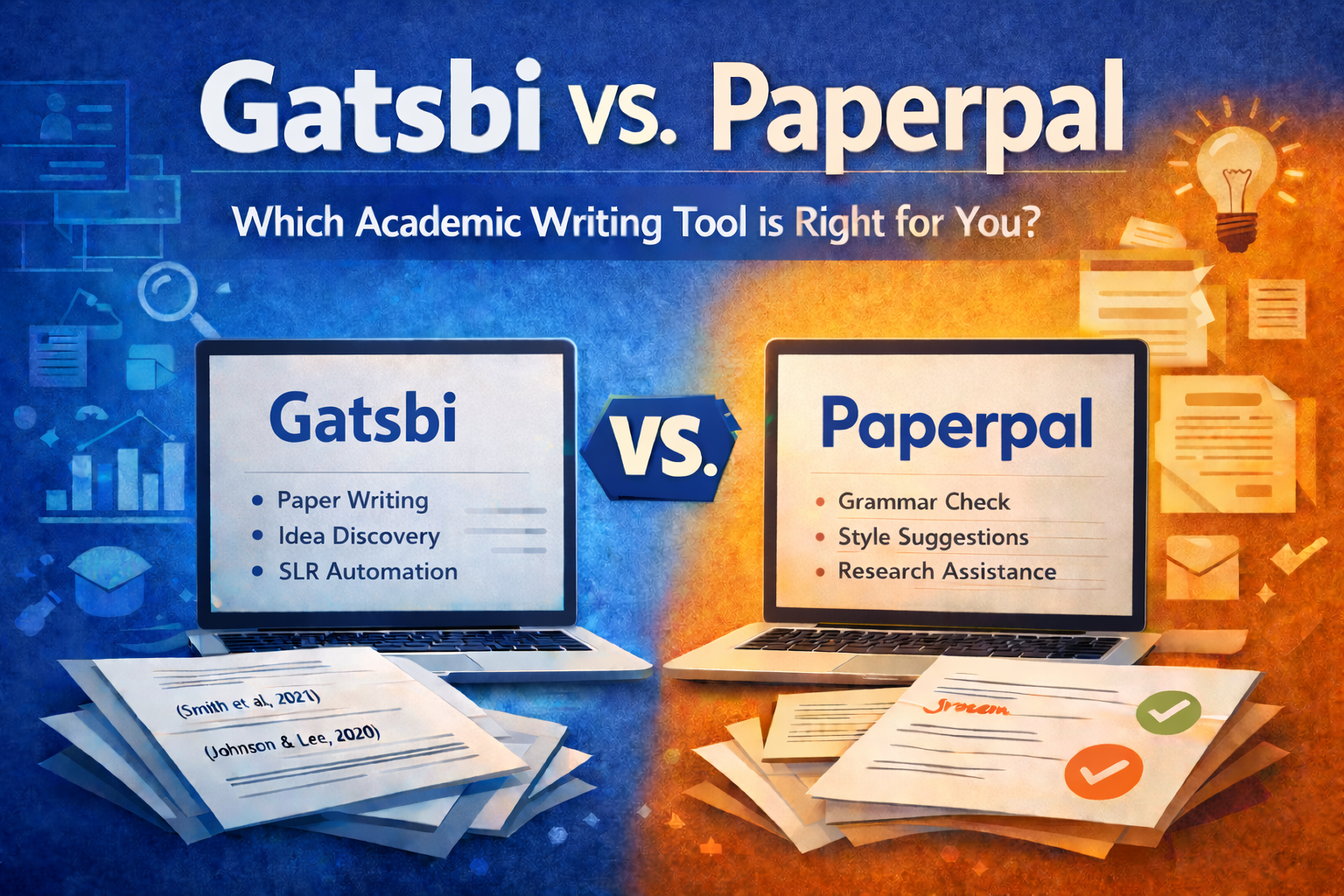
Gatsbi (gatsbi.com) is positioned as an end-to-end research workflow tool: ideation (“research gaps” and “innovative ideas”), scholarly writing (full manuscript drafts with citations/figures/equations), SLR/meta-analysis automation, and patent disclosure drafting.
It offers a desktop app (Windows/macOS) plus a web version and is organized into workflows such as “Gatsbi Innovator / Writer / Reviewer.”
The footer identifies corporate entities including Clouchie Limited and Dalian Yunzhihui Technology Co., Ltd..
Paperpal is an academic writing and submission-readiness assistant, marketed as “built by” Editage and published by Cactus Communications Services Pte Ltd (per Google Workspace Marketplace listing).
It emphasizes academic-language grammar and style support plus research/citation help and pre-submission checks, and it runs across common writing surfaces: web + add-ins/extensions (Word, Google Docs, Chrome, Overleaf).
Comparison table and analytical breakdown
Side-by-side comparison table
| Dimension | Gatsbi (gatsbi.com) | Paperpal |
|---|---|---|
| Core workflow | End-to-end research acceleration: ideation → deep research → full manuscript drafting; adds SLR/meta-analysis and patent disclosure workflows. | Embedded academic writing + submission readiness: language editing, rewriting, research/citation help, PDF chat, plagiarism checking, “30+” submission checks. |
| Target users (stated) | Researchers, engineers, students, enterprises; positioned as an “AI research assistant/co-scientist.” | Students and researchers; also positioned for universities/journals via compliance and preflight-style checks (publisher/partner messaging). |
| Platform support | Desktop app plus web version for Pro users; export to DOCX/LaTeX/Markdown. | Web plus writing-surface integrations: Word add-in, Google Docs add-on, Overleaf integration, Chrome extension. |
| Pricing posture | Pro subscription: $19.99/month; yearly plan advertised at $159.99/year; includes monthly plugin credits; “private usage” concept; some model backends require your own API keys. | Free tier with quotas; Prime priced at $25/month (official help center), with other billing cadences referenced on G2/Capterra. |
| Key AI features | “Deep Research Agent,” multi-model orchestration, automated figures/tables/equations; SLR/meta-analysis engine (fixed/random effects, plots, heterogeneity metrics). Claims a “Humanizer” plugin. | Predictive “Keep Writing,” custom instructions, paraphrasing/trim/tone, “Research & Cite” (250M+ articles claim), plagiarism checker, AI detector, and pre-submission checks. |
| Accuracy posture | Vendor claims citations are “accurate… linked to real academic sources” and that narratives are “grounded in real sources.” Independent verification of citation correctness was not found in peer-reviewed or major review platforms; treat as unverified. | Emphasizes “verify accuracy” via Research & Cite; still requires user validation. Detectors are positioned as signals, not definitive proof. |
| Privacy/data handling | Desktop: claims work stays local and Pro usage isn’t recorded, but queries still go to third-party AI providers; trial usage may be logged. Web: claims encrypted storage; privacy policy states storage on AWS and Alibaba Cloud across regions. | Claims strong security controls; data security page cites encryption, certified facilities, and compliance frameworks; claims user data is not used to train models. Some posts state 90-day file retention (scope may vary by feature). |
| Support | Helpdesk email and stated response time “within 72 hours” (company page). | Help center knowledge base + support email referenced in support articles and marketplace listing. |
Features and core functionality
Gatsbi’s differentiator is “workflow breadth.” Its product pages describe (a) generating research ideas with “originality scores” and references, (b) drafting manuscripts “complete with in-text citations, equations, figures, tables,” and (c) running SLRs/meta-analyses with screening, extraction, synthesis, and plots.
A dedicated Reviewer page explicitly claims integrated meta-analysis support such as fixed/random effects models, forest/funnel plots, and heterogeneity metrics (I², Q), alongside “structured manuscript generation.”
Paperpal’s differentiator is “in-surface academic writing assistance + compliance checks.” Its positioning stresses grammar/style/consistency tuned for academic writing, plus Research & Cite (250M+ articles claim), Chat-with-PDF flows, plagiarism checks, and “30+” submission readiness checks, available across Word/Docs/Chrome/Overleaf/web.
Paperpal also markets a “write–detect–review” loop through its AI Detector, framing it as insight-oriented rather than a policing verdict.
Target users and market positioning
Gatsbi’s messaging repeatedly targets researchers/innovators and positions itself beyond proofreading—moving into ideation and evidence synthesis and describing a multi-agent “agentic workflow” (implementation details “confidential”).
Paperpal positions itself as an “all-in-one AI academic writing assistant,” emphasizing academic-domain training and publishing experience (“23+ years of STM experience” appears across multiple Paperpal properties).
Pricing tiers and packaging
Gatsbi
- The pricing page shows Monthly Pro at $19.99/month and indicates a toggle for a Yearly Pro plan (exact yearly price is shown on the homepage as $159.99/year).
- The homepage advertises a 1-day free trial with selected features.
- An important packaging detail: some AI service options (OpenAI/Anthropic/Google) are described as “desktop-exclusive” and require your own API keys, while “xAI and Hybrid” token costs are covered by Gatsbi while your subscription is active.
- It also bundles “Plugin Credits,” explicitly noting they are used for plugins including a “Humanizer.”
Paperpal
- Official support documentation lists Paperpal Prime at $25/month, $55/quarter, and $139/year.
- Paperpal’s free plan is quota-based (e.g., “AI features up to 5 times a day,” plagiarism checks up to 7,000 words/month in free tier per help center).
- Paperpal’s plagiarism checks are explicitly capped: free plan up to 7,000 words/month, Prime up to 10,000 words/month, with optional add-on word packs.
- Teams pricing exists via a “Paperpal for Teams” group plan, with published discounts by team size (2–3: 10%, 4–6: 15%, 7–10: 25%).
- Paperpal’s own blog (2026) reiterates free-plan inclusions and Prime pricing, and mentions reduced pricing for lower purchasing power regions and a Teams starting price for some cohorts.
- The pricing page also references multi-year/teams options (details appear in search extracts even when not consistently visible in page text captures).
Integrations and platform support
Paperpal is broadly embedded into writers’ daily tools: it is presented as available on MS Word, Google Docs, Chrome, web, and Overleaf, and it offers platform-specific add-ons/extension installs (including a Google Workspace Marketplace listing).
The Paperpal Chrome extension is framed as turning “any webpage into your academic workspace,” bundling summarization, paraphrasing, and citation-based notetaking.
Gatsbi is primarily a standalone app plus web, whereas “integration” is achieved by exporting output for downstream editing/submission: Word (.docx), LaTeX, Markdown, and common citation styles.
AI capabilities and “accuracy” considerations
A useful way to think about capability/accuracy is: editing assistance vs. generative drafting vs. evidence synthesis.
- Editing assistance (Paperpal strength): Paperpal emphasizes grammar/style/consistency tuned for academic text, paraphrasing/word reduction/tone adjustments, and guidance features that stay “line-by-line” rather than writing entire manuscripts autonomously.
- Generative drafting (both, but more central to Gatsbi): Gatsbi explicitly promises “full-length…manuscript…complete with…verified reference list,” and Paperpal offers generative “Write” workflows and predictive writing suggestions with custom instructions.
- Evidence synthesis (Gatsbi differentiator): Gatsbi Reviewer describes an integrated pipeline: topic → screening → extraction → meta-analysis → manuscript generation.
Critical accuracy caveat (applies to any LLM-backed tool): citations and references require verification. A peer-reviewed 2024 study in the Journal of Medical Internet Research measured reference performance of LLMs in systematic-review-like tasks and found low precision/recall and substantial hallucination rates, concluding LLMs should not be used as the sole/primary tool for systematic reviews and that references warrant rigorous validation.
Even when a vendor claims “verifiable references,” users should treat citation grounding as a process requirement (open the source; confirm bibliographic metadata; confirm the cited claim is actually supported). Gatsbi itself encourages double-checking citations even while claiming “real, verifiable” references sourced from academic databases and Google Scholar.
AI detection accuracy caveat (applies to “AI detector” features): detectors are not reliable arbiters. OpenAI publicly discontinued its own AI text classifier due to low accuracy and documented false positives/false negatives and evasions, explicitly warning such classifiers should not be primary decision tools. A 2026 open-access study evaluating Turnitin and Originality detectors found moderate overall accuracy but poor performance on hybrid texts and emphasized detectors are unsuitable as a sole basis for misconduct decisions.
Paperpal’s own materials acknowledge false positives can occur and position their detector as contextual guidance rather than an authorship “verdict.”
Privacy, data handling, and governance
Paperpal privacy and security posture
Paperpal’s privacy posture is primarily cloud + extensions/add-ins, with explicit claims about not training on user data and standard security controls.
Key published claims include:
- “We don't train AI models on your data” on the pricing site.
- A 2023 Paperpal security post describes encryption (including “256-bit encryption” during transmission/storage), use of HTTPS/TLS, storage on Amazon Web Services, access controls, and a 90‑day automatic file deletion policy.
- The Editage trust center states “your research completely belongs to you,” describes access control practices, offers deletion via privacy team request, and cites compliance positions (GDPR) and certifications.
- Paperpal links to an ISO 42001:2023 certificate for Cactus Communications Pvt. Ltd issued by ISO Quality Services Limited (certificate visible in the linked PDF).
A nuance worth calling out: Paperpal’s AI Detector marketing claims “zero data retention” and “processed ephemerally” for that specific tool experience, which may differ from the broader editor/storage posture described in the 2023 “90 days” retention write-up. Treat this as feature-scope dependent unless Paperpal publishes a single comprehensive retention schedule that covers each feature uniformly.
Gatsbi privacy and security posture
Gatsbi emphasizes desktop-local work and “privacy” as a design principle, but also explicitly acknowledges that prompts/outputs go to third-party AI providers depending on configuration.
Key published claims include:
- Gatsbi’s user guide describes the desktop app as focused on “creativity, privacy,” stating “all your creative work stays local,” “servers do not collect or store user input/results,” and that it “uses third-party AI service providers securely.”
- A “Getting Started” post says Gatsbi.com servers generally do not collect/store user inputs/results (except rare error cases), but that user input/output will be transmitted to third-party AI service providers for processing.
- The pricing page defines “private usage” as not recording activity on Gatsbi.com, while still sending queries to third-party providers; it also notes that OpenAI/Anthropic/Google options “require your own API keys,” which is relevant for governance and vendor risk (you become a direct customer of the model provider).
- Gatsbi’s paper-writer page distinguishes desktop vs web handling: desktop data “stays local…nothing is sent to or stored on Gatsbi’s servers,” whereas web version data is “encrypted and stored securely,” and Gatsbi states it does not access it unless authorized for technical support.
Governance and responsible-use alignment
Because both tools can influence scholarly text, users should align them with journal/institution AI policies and disclosure expectations. The International Committee of Medical Journal Editors states AI tools should not be listed as authors and that humans remain responsible for accuracy/integrity/originality and must review/edit AI output because it can be incorrect/incomplete/biased.
Similarly, JAMA guidance notes policies that preclude nonhuman AI tools as authors and require transparent reporting of tool use in manuscript preparation.
Pros, cons, and recommendation scenarios
Pros and cons
Gatsbi — Pros
- Broad workflow coverage: ideation + manuscript drafting + SLR/meta-analysis + patent disclosure in one product line.
- Explicit SLR/meta-analysis automation claims (screening → extraction → synthesis → plots → manuscript), which goes beyond typical writing assistants.
- Strong export compatibility (DOCX/LaTeX/Markdown, common citation styles), helpful for research teams with established toolchains.
- Privacy-forward desktop framing: “local on device” storage posture plus “servers do not collect/store input/results” claims (desktop), which may appeal in sensitive IP contexts.
Gatsbi — Cons
- Higher integrity/accuracy risk surface because the tool markets full draft generation and evidence synthesis; rigorous verification is non-optional, especially for citations and meta-analysis extraction.
- Some configurations require your own API keys (OpenAI/Anthropic/Google) and thus shift cost/governance/terms-management onto the user or organization.
- The product advertises a “Humanizer” plugin aimed at reducing AI detection; regardless of intent, this feature class can be misused and may conflict with institutional policies.
- Independent testing from a detector vendor reported generated Gatsbi papers were detectable by multiple AI detectors in their sample runs (informative but should be weighed knowing the reviewer’s incentives).
Paperpal — Pros
- Deep availability across common academic writing surfaces (web, Word, Google Docs, Chrome, Overleaf), improving day-to-day usability and adoption.
- Strong suite breadth for writer-in-the-loop workflows: grammar/style/consistency, paraphrase/trim/tone, citation generation, PDF chat, plagiarism checks, and submission readiness checks.
- Clear published quotas and boundaries (e.g., plagiarism word limits, daily AI detector scans), which helps teams plan usage and compliance.
- Documented security posture (encryption, retention policy, cloud controls) and claims of no training on user data; plus trust-center disclosures and ISO certificate linkage.
Paperpal — Cons
- Many advanced capabilities are cloud-mediated and quota-limited in free tier; longer-document work typically requires Prime.
- Plagiarism checking is explicitly capped (10,000 words/month on Prime per support docs); heavy users may need add-on purchases.
- AI detector claims should be treated as “signals,” not ground truth; independent research shows detectors struggle with hybrid text and can raise fairness concerns.
- Paperpal is intentionally academic-tuned; even Paperpal’s own 2026 comparison write-up notes it may not work well for generic business/marketing formats.
Recommendation scenarios
Choose Paperpal when
- Your main pain is editing and polishing inside the tools you already use (Word/Docs/Overleaf/browser), and you want academic-language corrections, clarity improvements, and submission-readiness checks without switching to a separate drafting environment.
- You need structured, bounded integrity tools (similarity/plagiarism limits, detector scan limits) and documented support content for institutional roll-outs.
- You want customizable, prompt-guided drafting but still in a writer-controlled mode (custom instructions + “Keep Writing” predictive suggestions rather than one-click full paper generation).
Choose Gatsbi when
- You want front-loaded acceleration of research framing (idea generation + novelty comments + references) and are comfortable treating outputs as a structured starting point, not a submit-ready truth source.
- You specifically need SLR/meta-analysis workflow automation (screening/data extraction/plots/manuscript skeleton) and are prepared to validate extracted values and methodological choices, consistent with published warnings about LLM reliability in systematic review contexts.
- You prefer a desktop-local posture for sensitive research notes/IP and can manage the compliance implications of routing prompts to third-party model providers and/or supplying your own API keys.
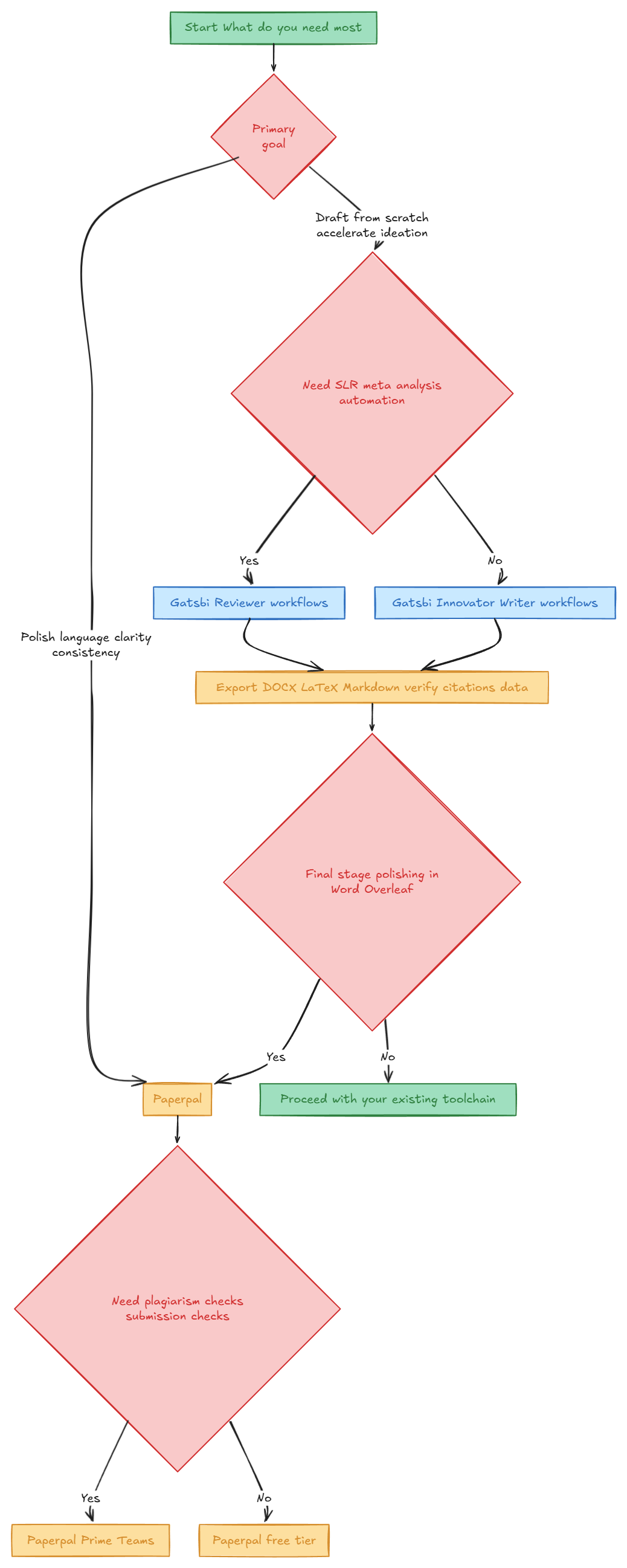
When you might use both A common pattern is: use Gatsbi for ideation and a structured first draft (especially for outlines, literature review scaffolding, and synthesis organization), then move the manuscript into Paperpal inside Word/Overleaf for line-level language refinement, consistency, plagiarism checks, and submission readiness. This “draft → polish → comply” workflow matches each tool’s published strengths (generation breadth vs. in-editor editing/compliance).
Short decision flowchart
Explore what you can do with Gatsbi
Gatsbi helps you move from early ideas to structured research and polished academic writing. Whether you are exploring a topic, drafting a paper, or working on a systematic review, Gatsbi provides practical tools to support each stage of the process.
Try Gatsbi Free