Gatsbi vs Research Rabbit Deep Comparison
— Gatsbi
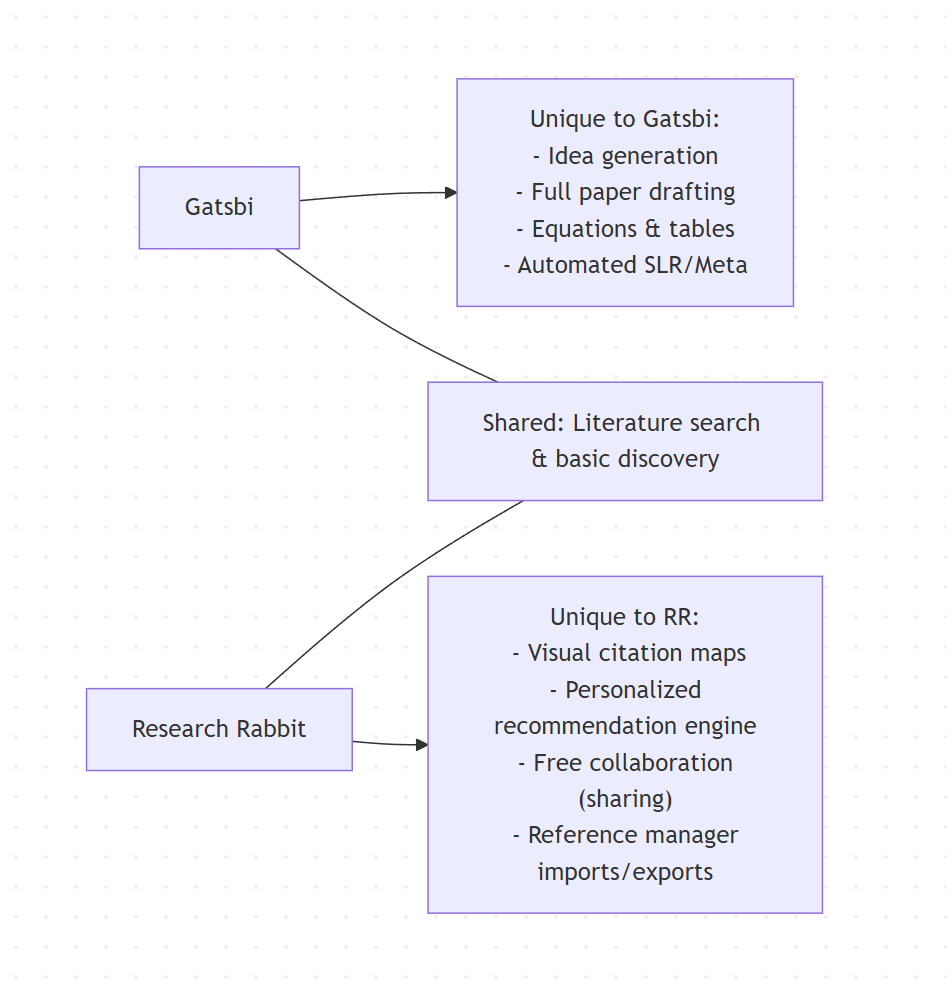
Gatsbi and Research Rabbit address different stages of the research process. Gatsbi is an AI-powered co-scientist designed as an end-to-end research assistant: it supports ideation, structured outlines, and full paper drafting with figures, tables, equations and citations. In contrast, Research Rabbit is a literature discovery tool focused on visualizing citation networks and finding relevant papers. Gatsbi provides features like automated systematic literature reviews, meta-analysis, patent writing, and a privacy-first desktop app. Research Rabbit offers interactive maps of related articles and authors, machine-learning–based recommendations, and integration with reference managers (Zotero, Mendeley, etc.). In short, Gatsbi is an all-in-one research writing and innovation platform (paid, with a free tier), whereas Research Rabbit is a free (freemium) discovery and collaboration tool for literature review.
| Feature/Aspect | Gatsbi | Research Rabbit |
|---|---|---|
| Core Focus | AI-driven writing and innovation assistant (idea-to-paper). | Citation-based literature discovery and mapping. |
| Literature Discovery | Limited (uses Google Scholar data during ideation). | Advanced: interactive maps of papers/authors; ML-based recommendations. |
| Manuscript Generation | Yes – full paper generation (abstract, methods, figures, equations, tables, formatted references) with one click. Up to 5,000 words (with word count estimator). | No – cannot draft manuscripts or format text. |
| Outlining & Structuring | Emphasizes structured outlines before writing (Innovator agent). | Not applicable (no writing features). |
| Citation Handling | Automated in-text citations and bibliography (supports APA, IEEE, Chicago, AMA, and more). | Builds on citation networks for discovery; does not edit text, but can import and export bibliographic data. |
| Collaboration | Local desktop use; no built-in sharing by default. History is stored locally on desktop or in encrypted cloud storage on the web version. | Share collections via invite or public link; collaboration is supported in real time. |
| Visualizations | Generates figures and tables for papers, including charts and meta-analysis plots. No interactive literature graphs. | Interactive graph maps of related papers, authors, and topics; supports “rabbit hole” exploration paths. |
| Discovery Algorithms | Uses multiple AI models for ideation and drafting. | Citation-network algorithms that adapt to reading patterns for recommendations. No LLM-based content generation. |
| Reference Manager Integration | Limited direct integration. Likely relies on manual BibTeX or CSV import. | Imports from Zotero, Mendeley, and EndNote via BibTeX; exports to BibTeX, RIS, and CSV. |
| Export Formats | Exports manuscripts to Word (.docx), LaTeX, and Markdown with multiple citation styles. | Exports paper lists to BibTeX, RIS, or CSV. No direct manuscript export. |
| Pricing/Plans | Free tier with limited usage; Pro at $19.99/month or $159.99/year. Plugin credits sold separately. | Free Forever plan with unlimited search and 50 seed articles; RR+ at $10/month for more seeds, projects, and advanced search. |
| Target Users | Graduate students, researchers, engineers, and enterprise teams looking for AI-supported writing and novel ideation. | Students and researchers focused on literature reviews, discovery, and trend analysis. |
| Data Privacy | Desktop app stores data locally; web version encrypts history. Queries may be sent to third-party AI APIs depending on setup. | Fully cloud-based; libraries and searches are stored online. |
| Platform | Native desktop app (Windows) plus web access for Pro users. | Web application only; browser-based and mobile-friendly. |
| Ease of Use | Feature-rich but more complex, with a steeper learning curve due to multiple modes. | Intuitive visual interface with minimal setup. |
Features and Capabilities
- Gatsbi is marketed as an “AI co-scientist” covering the full research lifecycle. Its core modules include:Gatsbi’s strength is integrated writing. It formats everything end-to-end: reference lists, in-text citations (APA/IEEE/Chicago/AMA, etc.) and handles equations/charts automatically. It uses multiple underlying LLMs (OpenAI, Anthropic, DeepSeek, etc.) to balance quality and cost. Users can regenerate sections and refine via iterative prompts (Copy, Regenerate, etc. buttons). A “Humanizer” plugin helps reword text to evade AI detectors.
- Innovator: Generates research ideas from a broad topic (requires user refinement). It supports structured ideation and question development.
- Writer: Drafts complete manuscripts. After expanding an idea, one click produces a full paper draft – from Abstract through Conclusion – including embedded citations, figures, equations, charts, and tables. Users specify a word count (up to 5,000 words) and Gatsbi outputs a formatted paper in academic style.
- Reviewer (SLR/Meta): Automates systematic literature reviews. Enter a topic, choose SLR or Meta-analysis mode, and Gatsbi searches databases, screens studies, extracts data, and writes the review. It even produces forest plots, funnel plots, heterogeneity metrics, and PRISMA-compliant summaries.
- Patent Generator: Drafts patent disclosures with claims (not elaborated in sources, but mentioned on the site).
- Research Rabbit is built around exploration. It visualizes how papers and authors interconnect through citations and co-citations. Key features include:
- Visual Map Navigation: Start with a seed paper (or author). RR displays related works as nodes on a timeline graph. Users can click any paper to expand the graph (show similar works, references, and citations). The interface lets you trace your search path (“rabbit hole” history) and return to earlier stages. For example, a toggle (“hole” icon) rewinds to previous search nodes.
- Personalized Recommendations: RR’s algorithms “learn from how you explore”. By tracking which papers/collections you save or ignore, it tailors future suggestions. It uses citation network analysis and (now) machine learning to surface emerging topics and highly relevant articles.
- Organization & Notes: You can create collections of saved articles (e.g. by theme or project) and add notes. The library is searchable. Collections can be shared or collaborated on.
- Reference Manager Sync: RR provides one-way import from Zotero or Mendeley (via BibTeX). This lets users bring existing libraries into RR. Export is supported too: any collection or search result can be exported to BibTeX, RIS, or CSV for use in citation managers. (A two-way Zotero sync is promised.)
Research Rabbit does not generate or edit manuscript text. It is purely a discovery and organization engine. Its algorithms rely on citation graphs rather than LLMs; no content is written by AI. This makes it fast and reliable for finding related literature, but it offers no drafting or writing assistance. Its biggest appeal is the interactive visual mapping: users “see how topics relate and evolve” and “trace the evolution of ideas” via network diagrams. Users on Research Rabbit note that it “feels more like following your curiosity than checking boxes”.
Workflows
Gatsbi workflow: Generally splits into Ideation and Writing phases. First, the user inputs a broad topic or problem. Gatsbi’s Innovator agent then proposes concrete research questions or ideas. The user refines or selects one idea and “expands” it into a detailed plan. Next, clicking “Write a Paper Manuscript” instructs Gatsbi Writer to generate sections of a paper sequentially. Throughout drafting, the user can adjust the outline, regenerate sections, or add notes. For literature review-type projects, one can use Gatsbi Reviewer: after entering a topic, the tool automatically collects and screens studies, then compiles the results into a structured draft. In practice, Gatsbi’s workflow is linear and user-driven: each step awaits user approval before moving on. Guidance (tooltips, tutorials) exists, but the system expects some user direction (e.g., curating ideas, checking outputs).
Research Rabbit workflow: The core flow is Iterative Discovery. A user starts with a known paper or author. RR immediately shows a graph of related papers (co-citations, references, etc.). From there, one can click nodes to zoom into their networks: e.g. click a “Similar Papers” node to see works cited by or similar to a given paper, or an author node to see that author’s publications. Each “click-and-expand” is saved as a step in the search path, which can be backtracked. Users often switch contexts: for instance, explore all works by authors in one cluster, then shift to analyzing references of a key paper. Throughout, one can save interesting articles to collections. RR also offers iterative search controls (filter by year, field, etc.). The workflow is highly exploratory and non-linear, resembling browsing a knowledge graph. According to a recent guide, “every search iteration is saved, allowing you to go back to earlier steps in your search… [mitigating] getting lost ‘down the rabbit hole’”.
Collaboration and Sharing
- Gatsbi: Primarily a single-user application. The desktop version stores all history locally, emphasizing privacy. There is no native feature for sharing projects or collaborative editing. (Enterprise or institutional deployments may allow team use, but that is not detailed publicly.) Users can export generated documents (e.g. docx or pdf) to share offline, but there is no cloud workspace for multiple authors. Gatsbi does track usage only on an opt-in basis to debug issues, so sensitive data stays private by default.
- Research Rabbit: Built for collaboration. Even on the free tier, you can invite collaborators to view or edit a collection. Collections can also be made public via a link. Sharing is integrated into the UI: for any collection, you can copy a shareable link or directly invite others. Additionally, you can export sets of papers (in BibTeX/RIS) to share with colleagues or use with other tools. The “Projects” feature (RR+ and Institutional plans) supports multiple parallel maps/workspaces per topic. Institutional accounts provide user management and usage analytics. In practice, a lab group could each import their libraries and combine efforts in shared RR projects. RR’s live site also lists many institutions (Stanford, Oxford, NUS, etc.) as users.
In summary, RR excels at collaboration for literature review, whereas Gatsbi does not offer team features (it assumes one researcher working on a project).
Discovery and Recommendation Algorithms
- Gatsbi: Does not emphasize a separate recommendation engine. Its discovery is SQL-like: it queries Google Scholar or databases when generating content (e.g. to find relevant citations during drafting). The technology uses a “complex agentic workflow” orchestrating multiple AI models. There is no mention of a personalization layer beyond the chosen AI model. Gatsbi’s novelty lies in applying innovation frameworks and LLMs to formulate research ideas, not in classical recommendation. In practice, literature discovery in Gatsbi happens in context of writing: it pulls in references as needed for a given section, but doesn’t provide an autonomous paper-suggestion service.
- Research Rabbit: Uses a citation-network approach. It indexes hundreds of millions of papers (280+ million). When you give RR a starting paper, it analyzes citation links: papers that cite or are cited by it. It also finds co-citations (papers often cited together). RR’s algorithms learn from your behavior: as you browse or save papers, it adapts suggestions to “your reading patterns”. The result is that recommendations become more tailored the more you use it. Unlike simple keyword search, RR’s discovery is analog (graph-based) and implicitly AI-driven over time. A user review noted that RR’s strength is in finding relevant papers quickly and letting users “trace through [their] search process”. It doesn’t use LLMs to summarize content; instead it relies on structured data (metadata and citations) to surface what papers might matter next.
Thus, Gatsbi is not a literature recommendation engine per se, while Research Rabbit is built around iterative, personalized discovery via citation graphs.
Visualization & Network Maps
- Gatsbi: Visualization in Gatsbi is focused on publication-ready output. It can generate charts (e.g. forest/funnel plots in meta-analysis mode) and format equations, but it does not offer a visual map of the literature. There is no concept of plotting authors/papers as nodes. Its interface is mostly text-based with output panels. One can embed figures into the paper drafts, but Gatsbi lacks an interactive network graph.
- Research Rabbit: Visualization is its hallmark. RR automatically creates interactive network graphs as you search. For a given search step, RR shows nodes (papers) on a timeline scatterplot; clicking “More like this” updates the map. It can show clusters of related works or the “citations of the paper you are reading” as an array of nodes. For example, RR’s UI places older, highly-cited papers at the top-right of the chart. A recent blog highlights RR’s maps with this caption: “Research Rabbit is a beloved free tool for citation-based literature discovery and visualization. It creates interactive network graphs showing how papers and authors are connected…”. Users can zoom, pan, and click through these maps to uncover hidden connections over time.
In short, Research Rabbit provides rich visual network maps for exploration, whereas Gatsbi’s visuals are limited to figures in papers (not exploratory graphs). The embedded figure above illustrates RR’s kind of interface (left) compared with another tool (Litmaps).
Integration with Reference Managers
- Gatsbi: There is no mention of integration with external reference managers. Gatsbi manages citations internally, likely by searching databases. Users must typically copy references from Gatsbi outputs or download its exports. It does not automatically sync with Zotero/Mendeley. There is no built-in import of personal libraries. Users can, however, export citations from Gatsbi-generated manuscripts (e.g., .bib or .docx reference lists) and then import them into their reference manager manually. Zotero integration is coming soon.
- Research Rabbit: Offers one-way imports from popular reference managers:Importantly, these are one-way transfers: changes in RR do not sync back to the original manager. (RR is working on full two-way Zotero sync.) In practice, students have successfully pulled their entire Zotero or Mendeley libraries into RR to jumpstart discovery.
- Zotero: Through the Zotero Importer, you link your account and select collections to import into RR. All items in those collections can be brought in, effectively using your Zotero library as RR’s starting library.
- Mendeley/Paperpile/EndNote: RR guides show that you export from these managers as BibTeX (.bib) and then upload that file into RR. This adds the papers to your RR library/collections.
- Export back to managers: You can export any selected list of RR papers to BibTeX, RIS, or CSV and then import those files back into your tool of choice. For example, exported .bib can be imported to Zotero or Mendeley.
Export/Import Formats
- Gatsbi exports complete documents in academic formats: Word (.docx), LaTeX, and Markdown. Users can also copy sections in Markdown via the GUI (copy button). Bibliographic style can be chosen (APA, IEEE, Chicago, etc.). Gatsbi does not have an open import format for literature lists, aside from using query inputs. It is primarily document-centric.
- Research Rabbit handles lists of papers. You can export any collection or search result to BibTeX, RIS, or CSV. This makes it easy to take the literature you’ve discovered in RR and move it into a reference manager or another tool. There is also a “Copy Citation” feature in RR for individual articles. Import for RR is via the methods above (Zotero one-click, or uploading BibTeX from Mendeley/EndNote). RR does not import PDF content or text files; it only ingests bibliographic metadata from those sources.
Pricing and Plans
- Gatsbi:
- Free Plan: “Basic features with limited usage”. Users can create an account and try ideation/writing on small scales. (Exact limits not public.)
- Monthly Pro: $19.99/month for unlimited access to all core features.
- Yearly Pro: $159.99/year (33% off).
- Additional “Plugin Credits” can be purchased for extras (e.g. the Humanizer plugin).
- Cancel anytime; desktop use has no hidden fees. Pro users get both desktop app and the new web version.
- Note: There is no institutional tier detailed on the site – pricing is per individual.
- Research Rabbit:
- Free Forever: $0 (no trial expiry). Unlimited literature search and collections, with core features. Limits: can use up to 50 seed articles in a search. Allows unlimited groups and sharing. Suitable for typical thesis/dissertation work.
- ResearchRabbit+ (RR+): Premium tier, $10/month (billed $120/yr). Unlocks advanced features: up to 300 seeds, multiple projects, faster support, advanced search filters. Country discounts available.
- Institution/Enterprise: Custom pricing. Includes site-wide implementation, LibKey integration, thousands of users, usage stats, dedicated support.
Gatsbi’s Pro is geared to individual researchers writing papers. RR’s free tier is generous, and RR+ is relatively inexpensive (comparable to typical journal article access fees) if you need more capacity. Importantly, as of 2025, RR has moved to a freemium model; it was 100% free earlier but now charges RR+ for large-scale use. Gatsbi remains entirely subscription-based (no permanent free license, aside from the basic tier).
Target Users
- Gatsbi targets active researchers and innovators (graduate students, engineers, R&D teams) who write and publish frequently. The FAQ explicitly mentions researchers, engineers, students, and enterprises (for patents). Its strength is for users who need help formulating research questions and drafting full academic papers. For example, PhD students or academics writing experimental or methodological papers would benefit. Gatsbi’s SLR and meta-analysis modules also suit evidence-based disciplines (e.g. healthcare, psychology) where systematic reviews are common. In short, anyone who must produce a research manuscript (or patent) and wants AI assistance through every stage.
- Research Rabbit is aimed at anyone doing literature review or reference mining. That includes undergraduates writing a thesis, grad students preparing a seminar, librarians, and research labs surveying a field. Since it’s free and easy to use, many students start with RR for projects. Researchers exploring a new field (e.g. looking for relevant methods or related work) will find RR’s visual maps helpful. Labs may adopt RR (via the institutional plan) to collectively curate papers. Notably, RR does not have tools for writing a paper, so it complements writing tools (even third-party AI assistants); it’s for discovery rather than composition. If your main goal is to see “who cites whom” or to track new literature in a domain, RR is suitable.
In practice, students and scholars focused on literature review will value RR’s visual search and free sharing. Researchers and innovators who need to streamline drafting will lean towards Gatsbi for its comprehensive writing workflow.
Onboarding and Learning Curve
- Gatsbi: With its broad functionality, Gatsbi has a steeper learning curve. There are multiple modes (Innovator, Writer, Reviewer, etc.) each with their own interface elements. New users may need time to understand how to craft prompts, expand ideas, and manage the outline. However, Gatsbi provides tutorials and best-practice guides (e.g. its blog and help center). Initial onboarding requires downloading a desktop app (Windows) and logging in. Users have noted that Gatsbi emphasizes planning (outlines and citation management) over just text generation. In short, expect some setup and learning before seeing benefits; the tool is powerful but not as plug-and-play as a simple editor.
- Research Rabbit: Generally very easy to pick up. The web interface is intuitive: you search or start from a known paper title/DOI, and the visual results appear automatically. No training is needed to understand adding papers to collections or clicking to expand maps. The RR blog and guides (like “Step-by-Step Guide to Using ResearchRabbit”) make basics clear. For literature mapping, it’s among the more beginner-friendly tools. Importing references (via drag-and-drop of .bib) may require one-time learning, but overall, students and faculty often find RR straightforward. The main hurdle might be large maps becoming dense, but the “back button” feature mitigates that.
User feedback suggests RR’s UI is “simpler” than competitors, making it quicker for novices. Contrast this with Gatsbi, where users often test if it improves outlining rather than just writing.
Known Limitations
- Gatsbi:
- Content quality: As an AI, it can produce plausible but inaccurate claims. Users must rigorously verify all outputs. The company warns that “it is your responsibility to verify feasibility” and disclaims any guarantee. In practice, users should check every citation and fact.
- Scope: Gatsbi is tailored to common academic paper types (empirical studies, methodological papers, case studies, SLRs). Very niche or creative formats may be unsupported.
- Length and detail: The 5,000-word cap means very long or multi-part papers must be split. Complex equations or new experimental data inputs are not handled beyond generic examples.
- Usability: Because it covers ideation through writing, beginners may find it overwhelming. There is little flexibility to use only parts of it without engaging the whole system.
- Dependency on external AI: Queries go to third-party LLM APIs, so performance depends on those services. If your region has limited access, one must use VPN or alternate model mode.
- Research Rabbit:
- Limited functionality: It does not write text or handle citations in manuscripts. Researchers needing actual writing help will find RR insufficient. It also lacks analytics beyond simple counts.
- Free tier constraints: The 50-seed limit can be restrictive for very broad topics. Power users often need RR+ for large-scale reviews.
- Algorithm biases: RR relies on citation networks. If a field’s literature network is sparse or citation-heavy on peripheral topics, RR may surface irrelevant “popular” papers (a common co-citation problem). It may emphasize older, highly-cited works unless guided otherwise.
- Data currency: Coverage is large, but may lag behind the newest preprints or conference papers. RR does not guarantee updates of the latest data.
- Privacy: All data and search history are on RR’s servers (encrypted), so confidentiality depends on their policies (not explicitly detailed). Teams handling sensitive topics should review RR’s terms (not provided in HTML).
- Technical: Very large graphs can become slow or cluttered. RR has tools to manage this, but on weak internet connections the UI might lag.
Pros and Cons
Gatsbi – Pros:
- Comprehensive: one platform for ideation, writing, SLR, and patents.
- Automates formatted manuscripts (citations, equations, visuals) from outline.
- Privacy-first design (desktop mode, local storage).
- Multi-model AI backend offers choice (OpenAI, Google, etc.).
- Can accelerate laborious tasks: users note it “automates in-text citations, references, equations, and data tables”.
- Paid support with 24h response time.
Gatsbi – Cons:
- Paid subscription required for full features (free version is limited).
- Steep learning curve; requires desktop install + login.
- Outputs need heavy checking; hallucinations possible (as with all AI assistants).
- No built-in collaboration; works best for individual use.
- Relies on external LLM providers for content (costs, access issues).
Research Rabbit – Pros:
- Free tier provides robust discovery: unlimited searches, 50 seeds, sharing.
- Intuitive visual interface; highly praised for “seeing how studies connect”.
- Adaptive recommendations (“learns your interests” as you use it).
- Integrates with Zotero/Mendeley for easy library import.
- Exports in standard formats (BibTeX/RIS) for citation managers.
- Collaboration support (share projects, invite colleagues) even on free plan.
- Established community; widely used by universities worldwide.
Research Rabbit – Cons:
- No writing tools: cannot generate or edit manuscripts.
- Free plan limits on seed articles and advanced features (seed limit, no multiple projects).
- Lacks some legacy features (e.g. author-based search removed; sharing on free plan changed).
- Some suggestions can be irrelevant (common issue in citation networks).
- Cloud-only (depends on internet and server uptime).
Recommendations
- For students and academics doing literature reviews: Research Rabbit is highly recommended. Its free plan is sufficient for most theses and projects. Users can quickly see “the big picture” of a field and curate relevant papers. The visual mapping makes it easier to organize and share findings. We suggest starting with RR to build your reading list, especially if you already have a Zotero/Mendeley library to import. (For advanced needs, the $10 RR+ adds more seed capacity and projects.)
- For researchers writing papers or applying for patents: Gatsbi could be valuable as a writing assistant, especially where structured outlines and citation formatting are needed. It can save time on drafting and ensure all sections (intro, methods, tables, etc.) are present. We recommend using the free version first to test ideation and small drafts. If you often write within 5k words and want AI help with references, Gatsbi Pro may be worth the cost. However, beware of its limits: you must still lead the thinking and verify results. Use Gatsbi to accelerate brainstorming and initial drafts, but plan for editing after.
- For collaborative labs or libraries: Research Rabbit’s institutional plan allows multiple users and analytics; it fits shared literature collection needs. Gatsbi has no multi-user mode, so for group projects on writing, stick with manual or other collaborative writing tools (Gatsbi is mainly single-user).
- Combining both: They are complementary. One could use RR to discover and organize sources, export the bibliography, then feed that knowledge into Gatsbi for writing (e.g. paste key findings or let Gatsbi cite those works). A combined workflow might maximize productivity.
Conclusion
Gatsbi and Research Rabbit serve distinct roles in the research workflow. Gatsbi is a bold attempt at an AI co-author: it automates much of the ideation-to-draft process with integrated writing tools. Research Rabbit is a next-generation search and organization platform for literature, excelling at visualizing and exploring the citation network. Neither completely replaces human expertise: Gatsbi requires oversight to ensure correctness, and Research Rabbit requires the user to interpret and validate connections.
For users prioritizing writing efficiency (drafting, formatting, generating structured text), Gatsbi is the more powerful choice – at a monetary cost and learning investment. For users prioritizing broad literature exploration and organization, especially with limited budget, Research Rabbit is ideal. In many cases, using them in tandem provides the best of both worlds: discover with RR, then draft with Gatsbi.
Take Your Research Further with Gatsbi
From early ideas to structured research and polished writing, Gatsbi supports every step of the academic workflow. Explore topics, refine directions, draft papers, and work on systematic reviews with practical AI tools built for researchers.
Try Gatsbi Free