Gatsbi and SciSpace are AI-powered research assistants with overlapping goals but distinct strengths. Gatsbi offers an end-to-end research workflow, from idea generation to drafting paper manuscripts, patent disclosures (further professional review), and systematic reviews, all with local processing for strong data privacy. SciSpace is a cloud-based AI research “super-agent” focused on literature exploration, analysis, and summarization across millions of papers. In practice, Gatsbi excels at generating new content and structured writing (including auto-formatted papers with citations, figures, and equations), while SciSpace excels at comprehending and organizing existing literature, offering features like “Chat with PDF” Q&A, automated literature reviews, and extensive citation tools.
Our analysis shows Gatsbi is ideal for researchers needing new ideas, full paper/patent drafting, and on-device privacy, whereas SciSpace is ideal for users needing rapid literature surveys, citation management, collaborative workspaces, and flexible access (web/mobile). Both have AI capabilities (summarization, writing assistance, citation handling), but they approach them differently (Gatsbi via structured workflows, SciSpace via interactive chat and tools). Gatsbi’s pricing is straightforward ($0/$20 mo/$160 yr) with unlimited usage; SciSpace offers a free tier and tiered plans ($20–$90/mo, plus team plans). Privacy-wise, Gatsbi’s desktop app keeps work local, while SciSpace uses encrypted cloud processing. Both tools are actively developed with responsive support, but SciSpace has a larger user community (over a million users) and richer integrations (reference managers, databases). In summary, choose Gatsbi if you prioritize creative research writing, privacy, and built-in ideation, and choose SciSpace if you prioritize deep literature analysis, collaboration features, and platform flexibility. The detailed comparison below reviews features, pros/cons, and recommended user personas for each.
Core Features and Functionality
- Gatsbi: An integrated AI “co-scientist” that supports the full research pipeline. It generates novel research ideas (with scored feasibility and references) from a topic, and can autonomously write complete academic manuscripts (abstract, intro, lit review, methods, results, discussion) or patent disclosures. Generated papers include properly formatted sections, figures, tables, equations, and accurate in-text citations (APA, IEEE, etc.) with a verified reference list. It also automates systematic literature reviews and meta-analyses, performing screening, data extraction, and statistical synthesis. Key features introduced in Gatsbi 3.0 include a Deep Research Agent that automatically searches the literature and gathers evidence to support every argument, plus a Humanizer plugin that rewrites AI-generated text into more natural academic language.
- SciSpace: A browser-based AI research platform (formerly Typeset) with an “AI Agent” that integrates dozens of tools and databases. Core functions include Chat with PDF (upload papers or datasets, then ask questions or request summaries; answers come with source-linked citations), a multi-paper literature review assistant (automatically finds, filters, and organizes relevant studies into an executive summary, tables, charts, etc.), and an AI writing assistant (suggests text completions with real-time citation integration and reference list updates). SciSpace also offers specialized tools: a paraphraser (20+ style tones), an AI content detector (flags AI-generated passages), a patent analysis module (automated patent landscaping and visualization), and even a PDF-to-video summarizer. In short, SciSpace covers research tasks from discovery to drafting, but emphasizes analysis and summarization of existing content, supported by a huge knowledge base (280M+ papers, 150+ tools).
Target Users & Ideal Use Cases
- Gatsbi: Geared toward academics, researchers, and R&D professionals who need end-to-end writing support. Official materials describe it as for “researchers, scientists, and innovators” who want to discover new research directions, automate literature reviews/meta-analyses, and draft paper manuscripts or patent disclosures (further professional review). Use cases include researchers or engineers drafting technical papers, startups preparing patent filings, or any scholar facing complex writing tasks. A user comment noted Gatsbi is built for “researchers, and academics who struggle more with structure and source management than wording alone” – i.e. it excels when organization and citation grounding are the bottleneck.
- SciSpace: Also serves academics and students but with emphasis on exploring existing literature. It’s popular with PhD candidates, lab researchers, and students who need to comprehend papers quickly. For example, SciSpace’s own materials highlight its use by PhD students (for reading papers outside their field) and researchers (for rapid literature reviews). Other use cases include journalists or communicators simplifying science, or R&D teams performing patent landscape studies. Any user who regularly reads many papers and needs search/Q&A on PDFs, citation management, and automated reviews will benefit. SciSpace’s free tier and Chrome extension also appeal to students on budgets or those working on the go.
AI Capabilities (Summarization, Q&A, Citation Handling)
- Summarization & Q&A: Gatsbi’s AI operates in a structured workflow (e.g. first generate outline, then draft sections). It automatically summarizes your input (“prior work” summary) as part of paper generation, and it can screen/summarize studies for SLR tasks. However, it does not offer a chat-style Q&A interface on arbitrary PDFs. In contrast, SciSpace shines at summarizing existing content. Its ChatPDF feature answers questions on any uploaded PDF, returning concise, citation-backed responses in seconds. It also provides detailed, section-wise summaries and simplified explanations of highlighted text. Users praise SciSpace’s ability to explain complex sections in plain language. Gatsbi has no “chat” mode, so if interactive Q&A on literature is critical, SciSpace has the edge.
- Citation Handling: Both tools excel here, but differently. Gatsbi embeds accurate, formatted in-text citations in its drafts and auto-generates reference lists in the chosen style. It supports major citation formats (APA, IEEE, Harvard, Chicago, AMA) and exports to Word/LaTeX/Markdown. SciSpace, meanwhile, offers a built-in Citation Generator that supports thousands of styles, and its AI writer suggests and formats citations on the fly. In practice, Gatsbi ensures all citations are internally generated from its integrated research, while SciSpace pulls from external databases (and even suggests related papers to cite). Both are robust, but Gatsbi’s approach is more end-to-end (citations come with the generated narrative), whereas SciSpace’s is more modular (you can generate a bibliography independently or within writing).
Supported Document Types & Integrations
- Gatsbi: Primarily a desktop and web app that writes documents. It accepts inputs like research notes, findings, or even partial drafts, then outputs full-length manuscripts. Outputs can be downloaded as Word (.docx), LaTeX, or Markdown files. It also generates figures, tables, and equations within those outputs. There is no mention of supporting attachments like PDFs or scraped web content — Gatsbi assumes you provide the research context or let it search for evidence. Gatsbi can be connected to multiple AI backends (OpenAI, Anthropic, Google, xAI, or its built-in “Hybrid” of open models). It logs into third-party accounts (Google, LinkedIn, GitHub) but has no known integration with reference managers or LMS.
- SciSpace: A cloud platform and browser extension, SciSpace works directly with PDFs and webpages. You can upload PDFs or use its Chrome extension (SciSpace Copilot) to access tools from any page. It automatically links with academic databases (over 59 databases, 150 tools), enabling quick search of 280M papers. SciSpace recently added integration with reference managers: for example, it supports Zotero/Mendeley syncing (per user forums and update videos) so your library of PDFs can be accessed in SciSpace. It also lets you export citation data (RIS/CSV), and its Chrome extension can highlight text and query it in SciSpace. In summary, SciSpace is designed to plug into existing research workflows, whereas Gatsbi is more standalone.
Collaboration Features
- Gatsbi: Primarily a single-user tool. Its desktop app is installed per user (3 devices limit). There is no built-in “team” plan or shared workspace; each user works on their machine or the beta web version. Gatsbi does allow login via work accounts, but it does not offer real-time co-authoring, group accounts, or SSO. (Enterprises can contact Gatsbi for licensing, but no explicit multi-user features are advertised.)
- SciSpace: Strong collaboration support. It offers a Teams plan with shared dashboards, project spaces, and admin features (SAML SSO, usage analytics). Teams can share literature lists and agent sessions. The Chrome extension works on any device, and SciSpace has a mobile app (Android/iOS) so users can access their work on the go. In user reviews, teams appreciate that multiple people can use SciSpace under one subscription and share saved references or chats. Overall, SciSpace is built for distributed teams; Gatsbi is for individual researchers.
Pricing Tiers & Value
- Gatsbi: Offers a Free plan (very limited daily usage of core features) and a Pro plan. Pro is $19.99 per month or $159.99/year (≈$13.33/mo). Both include unlimited usage of idea generation, paper writing, patents, and SLR features. No pay-as-you-go tokens for primary features. The Pro tier includes multi-AI backends and 2000 free “plugin credits” monthly (for extras like the Humanizer). The pricing is straightforward and relatively modest given Gatsbi’s scope. Gatsbi explicitly notes there are no hidden fees and even promotes a “Pay Once” annual cost with savings. There is no free tier for heavy use, but the one-day free trial lets you test most features. (No enterprise pricing is publicly listed.)
- SciSpace: More tiered and complex. It has a Free Basic plan (limited to 5 papers of high-quality AI output per day, basic search, one-column extraction). The Premium plan is ~$20/month (billed monthly) or $12/mo (billed annually) per user, with unlimited access to literature searches, AI Writer, citation tools, etc.. A Teams plan is ~$18/user/mo (annual) with collaboration features; this drops to ~$8/user if billed yearly. An Advanced plan ($90/mo) adds 5500 search credits and an expanded “Deep Review” SLR feature for larger analyses. Overall, SciSpace’s pricing is higher for power users but offers a free entry point. Compared to Gatsbi’s flat $20/mo, SciSpace can be more expensive especially for teams or advanced needs, but provides more flexible access levels. (Current promotions may give annual discounts up to ~40%.)
Privacy, Data Handling & Compliance
- Gatsbi: Emphasizes maximum privacy and local processing. The desktop app keeps all inputs and outputs on your device (“your creative work stays local”); Gatsbi’s servers do not collect or store your data unless you use the cloud features. Even online, Gatsbi uses 256-bit encryption and only stores data if you explicitly save it. The user guide explicitly says queries to third-party AI (OpenAI, etc.) are sent securely, and Gatsbi does not train on user data. In practice, this means sensitive research can stay on-premise. This makes Gatsbi suitable for confidential work (e.g. corporate R&D, unpublished research).
- SciSpace: Being cloud-based, it sends your data (PDFs, queries) to its servers. However, SciSpace notes 256-bit encryption in transit, and claims it “does not train on your data” (according to the ChatPDF page). SciSpace is SOC 2 certified (as per badges on its site), indicating standard data security and privacy practices. Nonetheless, any cloud system carries some risk, and privacy-conscious users may hesitate to upload unpublished manuscripts. SciSpace’s policy states that they may use aggregated metadata but not content for training. Overall, Gatsbi has a stronger privacy stance (local/no-cloud by default) whereas SciSpace trades that for convenience and features.
Platform Availability (Web, Desktop, Mobile, Extensions)
- Gatsbi: Runs as a desktop application (Windows 10/11 or macOS 13+). It requires installation (~2GB disk space) but does not need internet for core functions. A web version exists, letting you use Gatsbi in a browser on any OS. There is no mobile app or browser extension. Login supports Google/LinkedIn/GitHub accounts for convenience. In short, Gatsbi is primarily a local app (ideal for offline use), with an optional web UI.
- SciSpace: Fully web-based. You can access SciSpace via any browser (no install needed), and it offers a Chrome Extension (“SciSpace Copilot”) that injects AI tools into research sites. There’s also a mobile app (iOS/Android) for reading and Q&A on the go. The platform supports dozens of integrations (browser, reference managers, cloud storage) so it’s highly accessible. However, it does require internet access at all times.
Performance and User Experience
- Gatsbi: Users report that Gatsbi’s strength is structure and organization. Its interface walks you through ideation, outlining, drafting, and reviewing. In practice, Gatsbi tends to produce highly structured outputs, but as one developer-user noted, “maintaining coherence across sections” can be a challenge as drafts get longer. The desktop app can sometimes feel heavy (especially on older machines), but it lets you switch AI backends (including local open-source models). Exporting to Word/LaTeX is praised by users. The built-in plugins (like Humanizer) improve quality. Some users do note that Gatsbi is still maturing: they may find it less intuitive than a simple chat interface, and occasional AI oversights (like a misplaced citation) need human review. Overall, Gatsbi’s UX is tailored to research workflows: not a generic AI chatbot, but a step-by-step co-writing platform.
- SciSpace: Generally considered smooth and user-friendly. It uses a chat-like interface for many tools, which most users find familiar. Trustpilot reviewers praise SciSpace as “very easy to use”. Drag-and-drop of PDFs, instant chat replies, and real-time progress updates make the experience interactive. The load times are decent for small to mid projects, but some users mention slower performance with very large PDFs. Occasionally, technical glitches occur (e.g. a timeout on a huge batch analysis), but these are not widespread. The UI includes dashboards for projects, and the help center with tutorials is robust. In sum, SciSpace offers a polished, modern UX with guided onboarding (e.g. first-run tutorials) and responsive design, while Gatsbi requires a bit more setup (install) and has a desktop-centric workflow.
Customer Support and Community
- Gatsbi: A relatively small but responsive team. Gatsbi maintains an online user guide and FAQ (see links above), and users can submit support requests via email. The company actively engages in forums and appears quick to fix bugs. For example, one user’s Reddit discussion drew a reply from a Gatsbi developer explaining core design choices. There is no large user forum or Reddit community dedicated to Gatsbi yet. In short, support is personal and developer-driven, but not at the scale of a big SaaS.
- SciSpace: Boasts a large and active community. There are official support docs and FAQs, but also vibrant user forums on Reddit, Twitter, Discord, and elsewhere. Many researchers share SciSpace tips online, and the company appears in academic Twitter/LinkedIn discussions (see testimonials). SciSpace’s Trustpilot shows dozens of reviews (mostly positive), and the team often responds to complaints. Paid users get priority email/chat support, and the company offers webinars and training. Community engagement is a strong suit: if you have a question, you’ll likely find someone online to help.
Recent Updates & Roadmap Signals
- Gatsbi: Released version 3.0 recently, adding the Deep Research Agent (AI-driven evidence gathering). The product blog emphasizes AI agents and multi-model support. Gatsbi’s roadmap hints at more integrations (e.g. future support for adding proprietary data) and expanding multilingual output (the patent tool already supports 11 languages). There’s talk of integrating more databases and possibly adding collaboration features. Overall, Gatsbi is rapidly evolving from a paper-writer into a more autonomous research assistant, aligning with trends in “AI agents for research”.
- SciSpace: In 2025 SciSpace rebranded and launched its AI Research Agent (chatbot) that connects 150+ tools and 280M papers. Late 2025 updates introduced Zotero/Mendeley integration (per forum reports), a consolidated multi-PDF “deep review” interface, and new AI models. The company frequently rolls out new tools (e.g. the citation generator, PDF-to-video). Roadmap signals emphasize more advanced agent capabilities (automation of search workflows) and enterprise features (compliance checker, as hinted by their agents listing). The pace is brisk: SciSpace monthly updates address user requests and add high-profile functionalities. We expect continued expansion of team features and AI reasoning tools.
Limitations and Risks
Both platforms are powerful but have caveats. AI reliability is a common concern. SciSpace users note the summaries and answers are “generally reliable” but can contain “minor inaccuracies or misinterpretations”. One Trustpilot reviewer complained about “irrelevant articles” and summaries “not always faithful”. Gatsbi outputs similarly require user oversight; it won’t catch every nuance, and citations should be verified. Both tools warn users to check and refine AI output.
Another risk is academic integrity. Both Gatsbi and SciSpace explicitly require researchers to review AI content. Users must ensure originality and attribution. Over-reliance on AI could lead to plagiarism or unverified claims, so these tools should be seen as assistants, not substitutes for expert judgment.
A third limitation is scope coverage. Gatsbi’s knowledge is as good as its AI training cutoff; it may miss very recent papers unless the user supplies them. SciSpace’s breadth (280M papers) is larger, but even it can’t access proprietary paywalled content without user input. Both tools work best when the user supplements them with domain expertise.
Finally, cost can be a barrier. Serious users of SciSpace often must subscribe to the paid plans (the free tier is quite limited). Gatsbi has no free-plan alternative (the free is trial-like), so it’s a commitment. Users should weigh these costs against time saved.
Comparison Table
| Attribute | Gatsbi | SciSpace |
|---|---|---|
| Key Functions | Research idea generation, full academic manuscript drafting, patent disclosure drafting, and systematic review or meta-analysis workflows in one platform. | Literature search, Chat with PDF, paper summarization, automated literature reviews, citation support, paraphrasing, and related research analysis. |
| Best For | Researchers and R&D teams who want end-to-end writing support, from idea exploration to structured draft generation. | Students, researchers, and teams who spend more time reading, searching, organizing, and understanding existing papers. |
| AI Workflow | More structured and creation-focused. It is designed to help users turn notes or research goals into full outputs with sections, citations, tables, and equations. | More interactive and analysis-focused. It is designed around querying papers, extracting insights, and navigating literature through chat-like workflows. |
| Citation Handling | Strong built-in citation support for generated academic drafts, with formatted references and export-ready manuscripts. | Strong citation generation and bibliography tools, plus citation suggestions during writing and literature analysis. |
| Literature Review | Supports systematic reviews and meta-analyses as part of a broader end-to-end research workflow. | Especially strong for literature discovery, paper comparison, evidence extraction, and fast summarization of existing research. |
| PDF Chat | Not the main focus. Gatsbi is oriented more toward research creation and structured drafting than interactive PDF Q&A. | One of its most visible strengths. Users can upload papers and ask questions directly through Chat with PDF. |
| Document Support | Focuses on turning prompts, notes, and research materials into full-length academic outputs that can be exported in researcher-friendly formats. | Works well with PDFs, web pages, extracted references, and literature databases, making it strong for reading-heavy workflows. |
| Integrations | Better suited for a self-contained research drafting workflow, with support for multiple AI model backends. | Stronger ecosystem integration, including browser-based workflows and research-tool connectivity for reading and organizing papers. |
| Collaboration | Better for individual researchers who want a focused private workspace. | Better for shared or team-oriented workflows, especially when collaboration and cloud access matter. |
| Privacy | A stronger choice for privacy-conscious users, especially those who prefer desktop-first and local-first research workflows. | More cloud-centric, which improves accessibility and convenience but may be less appealing for highly confidential projects. |
| Platform Availability | Primarily desktop-oriented, with web access available in supported scenarios. | Strong browser-based accessibility, with web-first usage and broader cross-device convenience. |
| Pricing Style | Simpler pricing structure and easier to understand for users who mainly want one research-writing platform. | More tiered pricing, which gives flexibility but can feel more complex depending on usage level and team needs. |
| Main Advantage | Best for turning research ideas into structured academic outputs quickly. | Best for exploring, understanding, and organizing existing literature efficiently. |
| Main Limitation | Less focused on chat-style PDF interrogation and team collaboration. | Less centered on full end-to-end manuscript generation from scratch and less privacy-oriented than a local-first workflow. |
Pros & Cons
- Gatsbi (Pros):
- End-to-end research co-writing (idea to paper/patent) in one tool.
- Local-first privacy (desktop app does not send your data to server).
- Strong support for academic formatting: auto-citations, figures/tables/equations generation.
- Includes literature review/meta-analysis automation, not just writing.
- Flat pricing with unlimited usage (lower cost for power users).
- Gatsbi (Cons):
- No free-tier for serious work (only short trial).
- Lacks collaboration features or cloud sharing (single-user only).
- No built-in chat/Q&A on arbitrary PDFs (focus is on generation, not document Q&A).
- Desktop app may have a learning curve; smaller user base means fewer peer resources.
- AI can still make mistakes — outputs must be verified (no magic accuracy).
- SciSpace (Pros):
- Powerful literature exploration tools: Q&A on PDFs, organized lit reviews, patent analysis.
- Built-in citation/reference management and writing aids (paraphraser, AI detector).
- Rich integrations: Chrome extension, mobile app, Zotero/Mendeley sync.
- Free usage tier and team plans (flexible for students and groups).
- Large user community and active support (frequent updates, responsive team).
- SciSpace (Cons):
- Most powerful features require paid plan (free tier is limited).
- Cost can be high for teams or heavy users (advanced plan is $90/mo).
- Data resides in the cloud (less suitable for confidential projects).
- Occasional accuracy issues in AI summaries.
- Interface can be overwhelming given the many features (steeper learning for novices).
Recommendation and User Personas
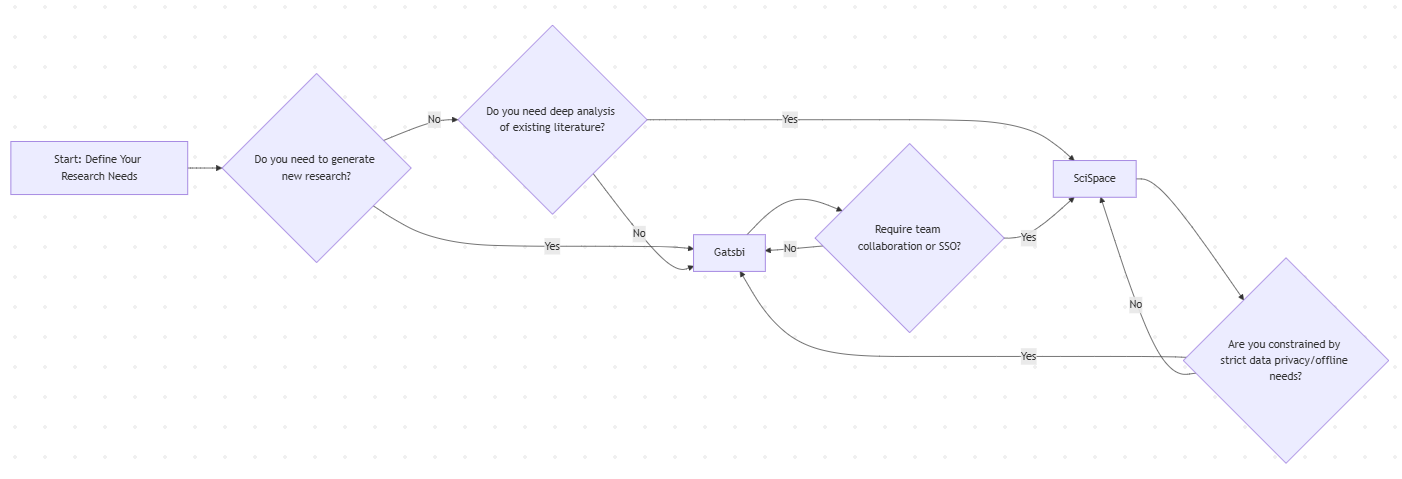
Choose Gatsbi if your workflow centers on creating new research content and privacy is paramount. For example: “A researcher or an engineer drafting a technical report, or a startup patent team seeking rapid drafts.” Gatsbi’s co-writing assistance and local processing make it ideal for data-sensitive writing projects. Its fixed pricing also suits power users who will generate many papers.
Choose SciSpace if you spend most time analyzing and synthesizing existing literature, especially in a collaborative or cloud-based environment. For instance: “A graduate student conducting a systematic review, a research team compiling related work, or a science journalist fact-checking papers.” SciSpace’s ChatPDF, auto-literature review, and integration with reference tools will accelerate understanding and organizing published research. Its free tier is a plus for students, and its team features help labs share insights.
Gatsbi — AI for the Full Research Workflow
Explore research ideas, review the literature, draft academic papers, and refine your writing — all in one place built for serious research.
Start with Gatsbi