Backbone AI Service Setup Guide

Login
Once installed, you have several options to log into Gatsbi. The interface is straightforward:
- Direct Login:
- Enter your email address and password
- Check "Remember my password" if desired
- Click "Log in"
- Alternative Sign-in Methods via Third-party Accounts: Google, LinkedIn, or Github.
New users can create an account by clicking "Sign up" below the login button.
AI Service Providers
For Gatsbi Desktop, you can switch the backbone AI service in the Settings (⚙️) panel.

Your AI service provider is set to Hybrid (Volcengine) by default, a service that orchestrates multiple AI models. Token fees for this service are covered by your subscription plan. There is an alternative option, Hybrid (SiliconFlow), for users who experience connectivity issues with Volcengine.
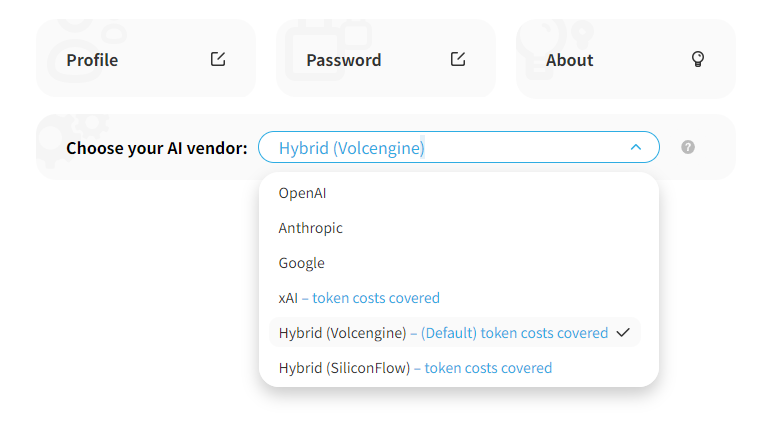
You may switch to advanced AI services, including OpenAI (GPT), Google (Gemini), Anthropic (Claude) and xAI (Grok). To use OpenAI, Google or Anthropic, you’ll need to provide your own API keys. Token usage will be billed directly by the respective service provider. Token fees for xAI are covered by your subscription plan.
In regions where the selected service is inaccessible, you may configure a proxy by specifying its BASE_URL and API_KEY. You are solely responsible for ensuring your use complies with AI service provider’s terms of service.
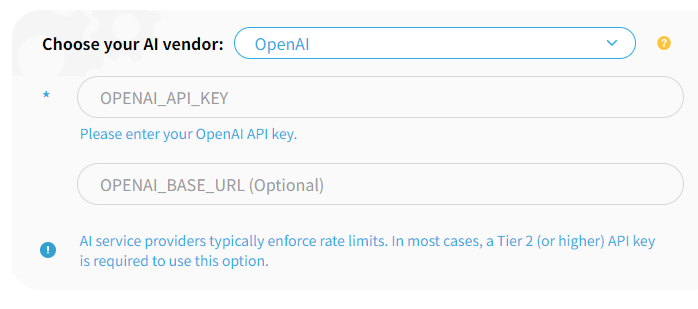
AI service providers typically enforce rate limits. In many cases, an API key with Tier 2 (or higher) rate limits is recommended for reliable use. Lower-tier keys may encounter request throttling depending on the provider’s policies. Some proxy services may also help mitigate rate limit issues.
Ready to boost Your Research and Writing?
Craft innovative, tailored solutions for research challenges with advanced AI technology, and achieve unprecedented productivity gains in paper and patent writing.
Start Innovation Now