The Humanizer Plugin
The Humanizer Plugin helps refine AI-assisted manuscript drafts by improving academic tone, readability, coherence, and natural expression, while preserving the original structure, meaning, and technical accuracy.
Step-by-Step Guide
1. Generate Your Manuscript
Start by generating a research paper draft using Gatsbi as usual.
2. Click the “Humanizer” Button
Once the manuscript is ready, simply click the “Humanizer” button.
You'll find it next to the export button at the interaction zone of the user interface.

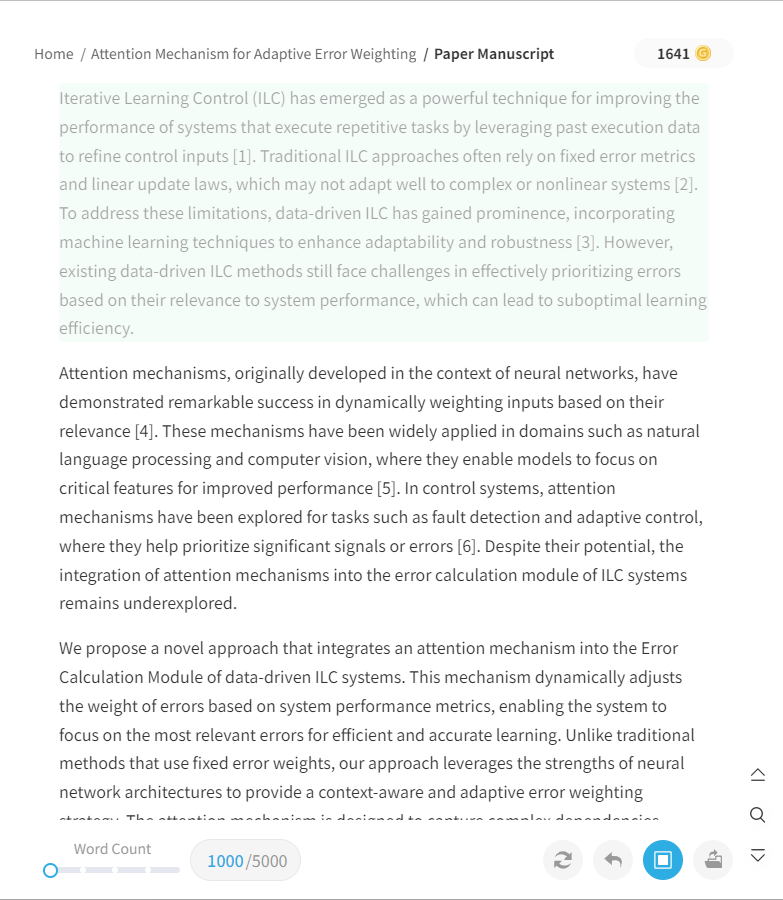
3. Paragraph-by-Paragraph Rewriting
The Humanizer will process your manuscript paragraph by paragraph, rewriting each passage to sound more natural and academically polished.
Academic Precision Matters
Gatsbi’s Humanizer helps refine AI-assisted manuscript drafts by improving academic tone, fluency, clarity, and logical coherence, while preserving the original meaning, technical accuracy, and structure of the content. It helps the text better follow the conventions of scholarly writing without making it harder to understand.
The Humanizer Plugin is not designed or intended to bypass AI-detection systems, misrepresent authorship, or support any form of academic misconduct, plagiarism, or deceptive use. Users remain responsible for reviewing all generated or revised content and ensuring that their work complies with applicable institutional policies, journal guidelines, disclosure requirements, and academic integrity standards.
Plugin Credit Usage
Using the Humanizer consumes Plugin Credits:
- 100 credits per 1,000 words
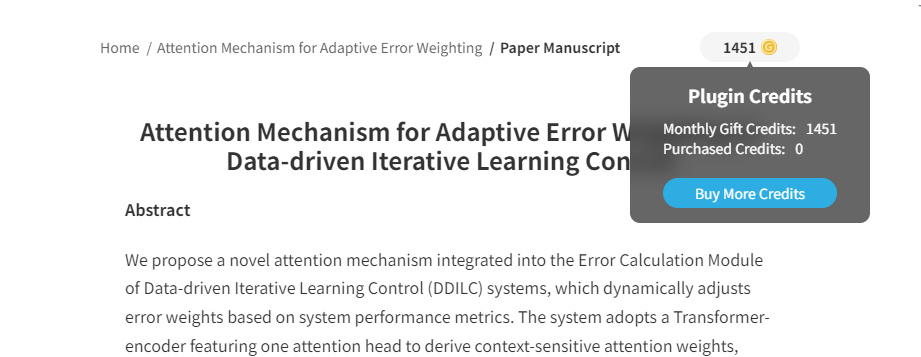
You can track your remaining balance at the top-right of the paper generation interface. If you run low, simply click "Buy More Credits" to top up instantly.