Import from Zotero
Gatsbi Reviewer (V3.2) now supports importing literature directly from your Zotero library, allowing you to create a systematic literature review or meta-analysis draft based on papers you have already collected and organized.
This is especially useful if you have already completed your own literature search, maintained a curated Zotero collection, or want to use a specific set of studies instead of relying on Gatsbi’s automatic search and screening workflow.
Why Import from Zotero?
In a standard Gatsbi Reviewer workflow, Gatsbi can help search academic databases, screen studies, extract information, and synthesize results automatically.
However, many researchers already manage their literature in Zotero. You may have manually collected papers, organized them into collections, or already decided which studies should be included in your review.
With Import literature from Zotero, you can bring your existing Zotero papers into Gatsbi Reviewer and continue the review process from there.
This allows you to:
- Use your own curated literature list.
- Import papers from a Zotero collection or selected individual items.
- Provide your own review protocol and PRISMA information.
- Review and edit synthesis results before manuscript drafting.
- Generate a systematic review or meta-analysis draft based on your selected literature.
When Should You Use Zotero Import?
You should consider using Zotero import if:
- You have already collected relevant studies in Zotero.
- Your review team has manually screened and selected papers.
- You want full control over the included literature.
- You are preparing a systematic literature review based on a predefined library.
- You want to use Gatsbi for synthesis and drafting, but not for the initial search process.
- You are conducting a meta-analysis and already have a set of eligible studies.
If you want Gatsbi to search and screen literature automatically, you can use the standard Reviewer workflow instead.
Step 1: Open the Zotero Import Option
On the Gatsbi Reviewer page, click the + button next to the input box.
From the menu, select Import literature from Zotero.
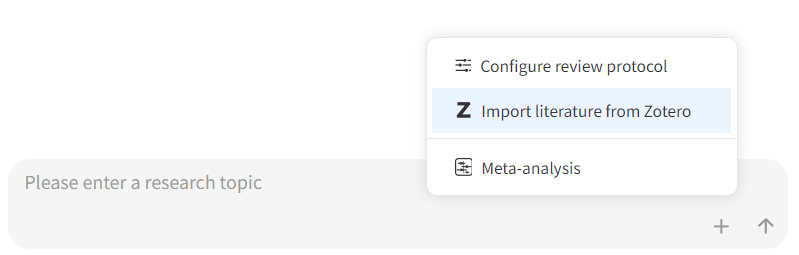
This will open the Zotero import wizard, where you can provide your review topic, connect to your Zotero library, select papers, and configure the review process.
Step 2: Enter Your Research Topic and Research Question
First, enter your research topic and research question.
The research topic tells Gatsbi what your review is about. The research question helps define the scope and direction of the systematic review or meta-analysis.
For example:
Research Topic:
Effectiveness of online learning in higher education
Research Question:
What is the effectiveness of online learning compared with traditional face-to-face learning among university students?
A clear research question helps Gatsbi understand how to organize and synthesize the imported literature.
Step 3: Choose Local or Cloud Zotero Library
Next, choose how you want to import your Zotero library.
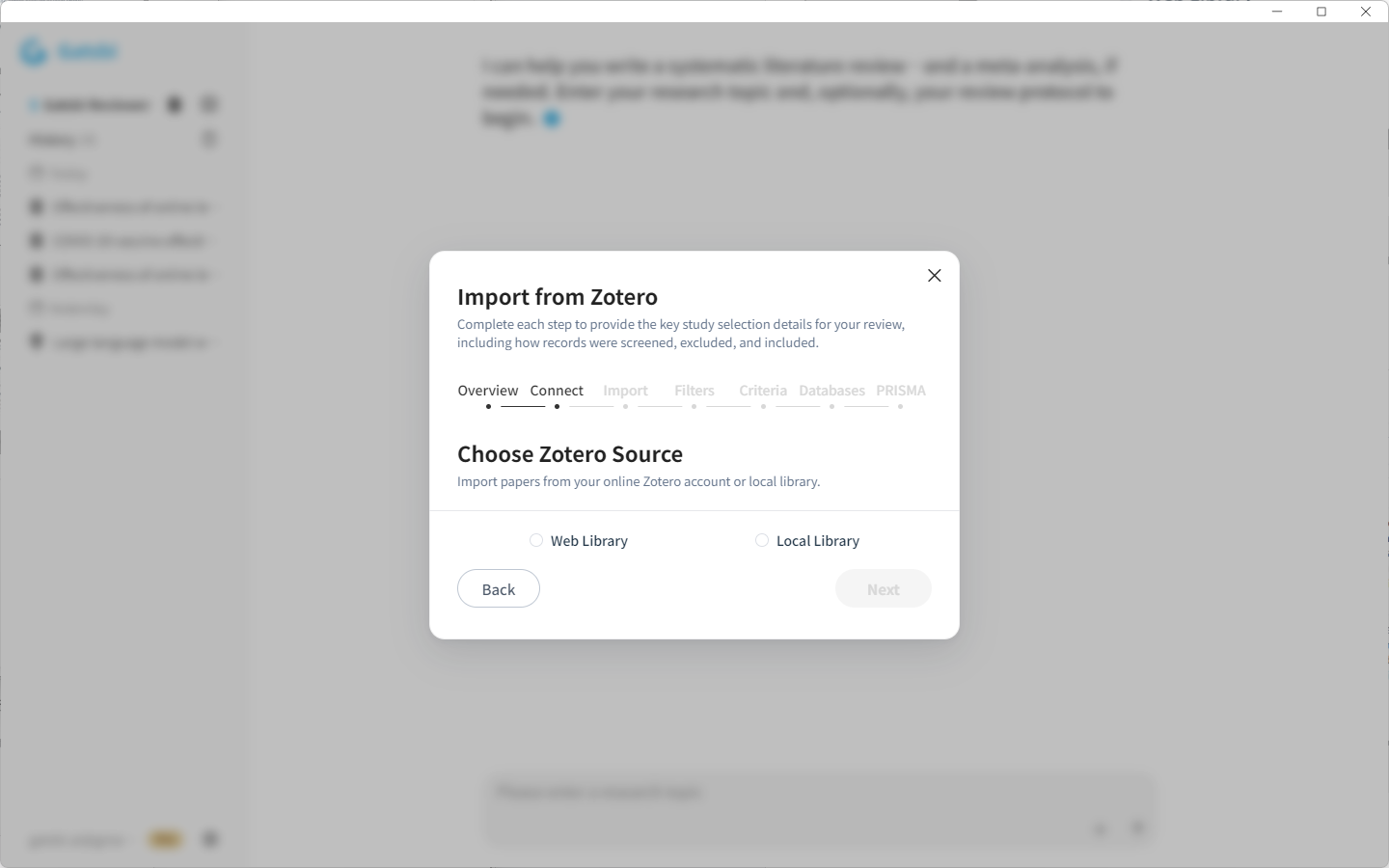
You can import literature from either:
Local Zotero Library
Use this option if your Zotero library is stored on your local device.
Gatsbi will read the selected local Zotero data and allow you to choose papers or collections for import.
Cloud Zotero Library
Use this option if you want to import papers from your Zotero cloud account.
You will need to log in and authorize access to your Zotero library. After authorization, Gatsbi will display your Zotero collections and literature items.
Step 4: Select Collections or Individual Papers
After your Zotero library is loaded, you can select the literature you want to import.
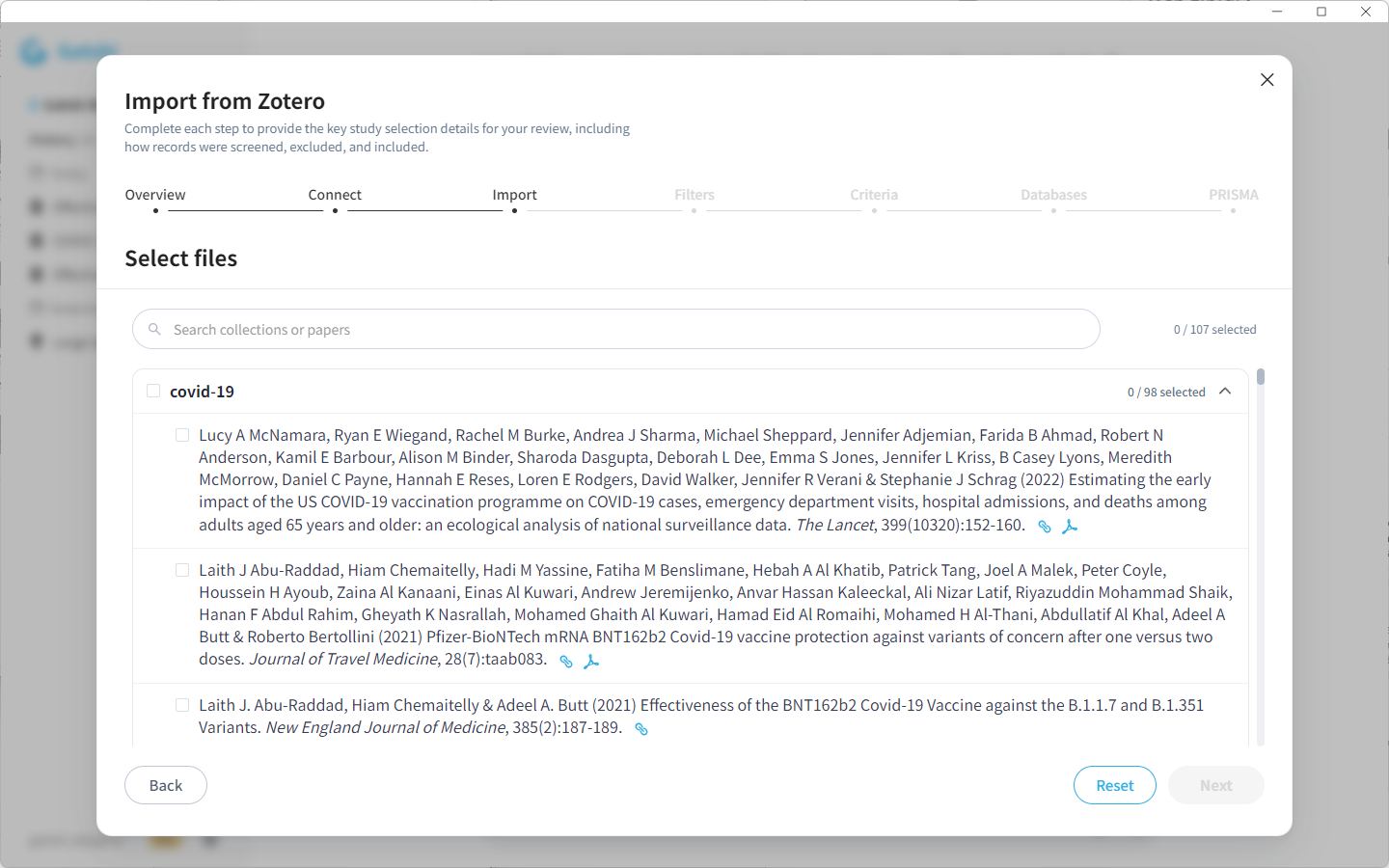
You may choose:
- An entire Zotero collection.
- Multiple collections.
- Individual papers from your library.
This gives you flexibility depending on how your Zotero library is organized.
For example, if you have a collection named COVID-19 Vaccine Effectiveness Review, you can import the entire collection. If your collection contains extra background reading, you can select only the papers that should be included in the review.
Step 5: Configure the Review Protocol
Because Zotero import uses your own literature list instead of Gatsbi’s automatic search and screening workflow, you need to provide additional review protocol information.
This helps Gatsbi understand how the imported studies were searched, screened, and selected.
You may need to provide details such as:
- Research question
- Filtering rules
- Review framework, such as PICOS, PEO, SPIDER, or SPICE
- Search strategy
- Databases or sources searched
- Inclusion criteria
- Exclusion criteria
This protocol guides how Gatsbi interprets and synthesizes the included studies.
Step 6: Provide PRISMA Process Data
You will also need to provide PRISMA process information.
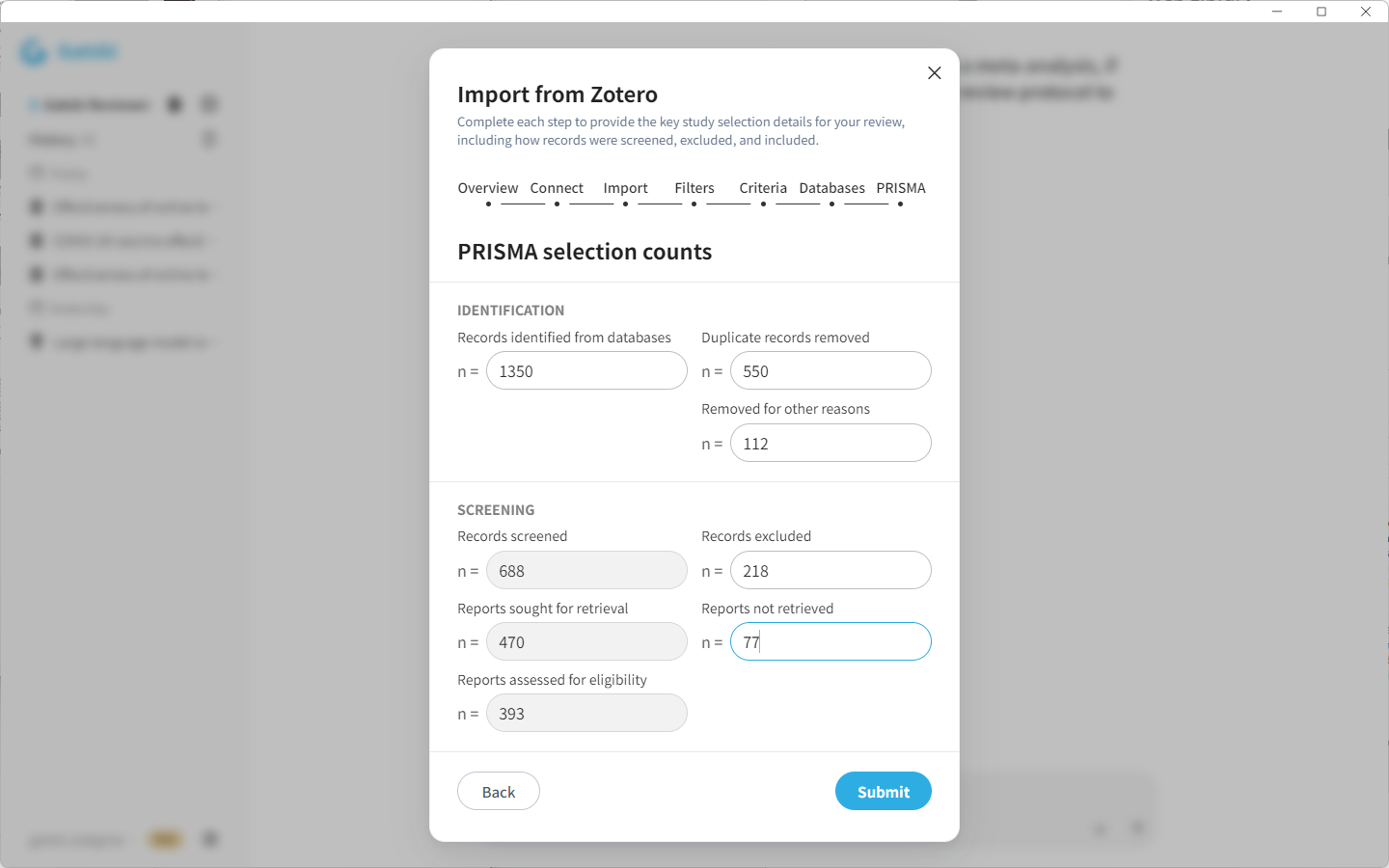
Since the papers are imported from your Zotero library, Gatsbi may not know the full search and screening history unless you provide it manually.
Typical PRISMA information may include:
- Total records identified
- Duplicate records removed
- Records screened
- Records excluded during screening
- Reports sought for retrieval
- Reports not retrieved
- Reports assessed for eligibility
Reports excluded after full-text assessment and studies included in the final review will be determined automatically after the synthesis process.
Step 7: Submit and Import the Papers
After selecting your papers and completing the required review information, click Submit.
The import process may take some time. Gatsbi will process the selected Zotero items, read the available metadata and documents, and prepare them for review synthesis.
Step 8: Review the Imported Literature List
Once the import is complete, Gatsbi will generate a summary of the imported papers and display the literature list.
You should carefully review the imported studies before continuing.
Check whether:
- The correct papers were imported.
- The imported list matches your intended review scope.
- Any irrelevant papers should be removed.
- Any missing papers need to be added later.
This step is important because the quality of the final review depends on the accuracy and relevance of the included studies.
Step 9: Continue with the Standard Reviewer Workflow
After the Zotero import is complete, the remaining steps follow the same workflow as the standard Gatsbi Reviewer process. Gatsbi will generate Synthesis Results based on your imported literature and review protocol. You can review and edit the synthesis results before continuing, then click Synthesize to generate a structured systematic literature review or meta-analysis draft. For more details about the next steps, please refer to the standard Gatsbi Reviewer guides for creating a systematic literature review or meta-analysis.
Best Practices for Zotero Import
To get better results, we recommend preparing your Zotero library before import.
Make sure that:
- Your selected papers are relevant to the review topic.
- Zotero metadata is complete and accurate.
- Titles, authors, years, abstracts, and DOIs are correctly stored.
- PDFs are available when possible.
- Collections are clearly organized.
- The review protocol is specific and consistent.
- PRISMA data reflects your actual search and screening process.
A well-organized Zotero library can significantly improve the quality of the generated synthesis results.
Zotero Import vs. Automatic Search
Both workflows are useful, but they serve different needs.
Use automatic search when you want Gatsbi to help discover, screen, and synthesize literature from the beginning.
Use Import literature from Zotero when you already have a curated literature list and want Gatsbi to help with synthesis, organization, and manuscript drafting.
In short:
Automatic Search is best for starting a review from a research topic.
Zotero Import is best for continuing from an existing literature library.
Final Thoughts
The Zotero import feature gives researchers more control over the systematic review and meta-analysis workflow.
Instead of starting from a new database search, you can use papers you have already collected, provide your own protocol and PRISMA information, and continue directly into synthesis and manuscript drafting.
This makes Gatsbi Reviewer more flexible for researchers who already uses Zotero as part of their academic workflow.